师编制设计
原页面:Division designer
The division designer is a utility located in the "Recruit & Deploy" menu of the user interface. The division designer enables players to create organizational templates for divisions, which are units that can be assigned to command groups and engaged in land warfare. Once created, these templates can then be trained, equipped, and deployed. Modifications to templates are automatically applied to all divisions that utilize that template. In order to transition divisions to a new template on an individual or rolling basis rather than all at once, it is possible to make the template change in a duplicate template and then reassign the divisions to the modified template when desired.
It is important for players to be aware of the potential for enhancing their forces by incorporating superior templates as they accrue experience in the game, given that the initial formations of most countries do not align with optimal standards. The initial units are typically smaller or composed exclusively of infantry, and their effectiveness is enhanced when additional troop types are incorporated.
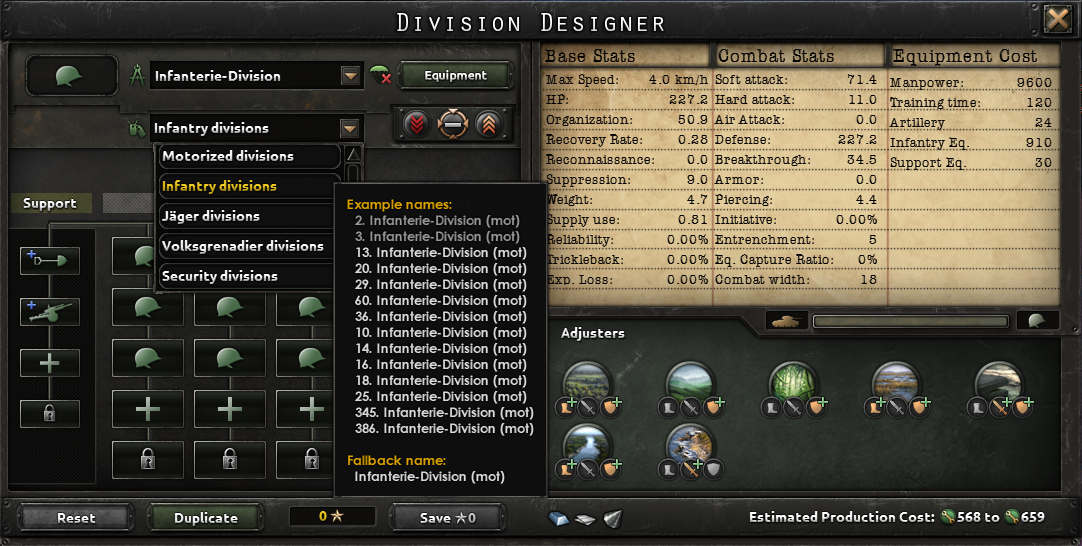
Creating a template
General options
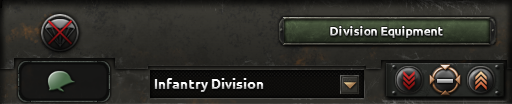
Selecting Template
As every nation starts with some form of basic template, it is often advisable to edit this as technology,  army experience, manpower and equipment become available. It is also possible to design a template from the ground up using the create new option in the template selection menu.
Selecting Name List
With the 1.5 patch, templates can now have a name-list too, with historical unit names selected. This function (indicated by the "dog-tag" to its left) renames all templates of this type according to the list selected. The names appear in white type in contrast to green division names that are a custom function (despite some units with templates with historical names pre-selected starting the game with green type custom names). The name list itself is not editable except through mods.
师装备
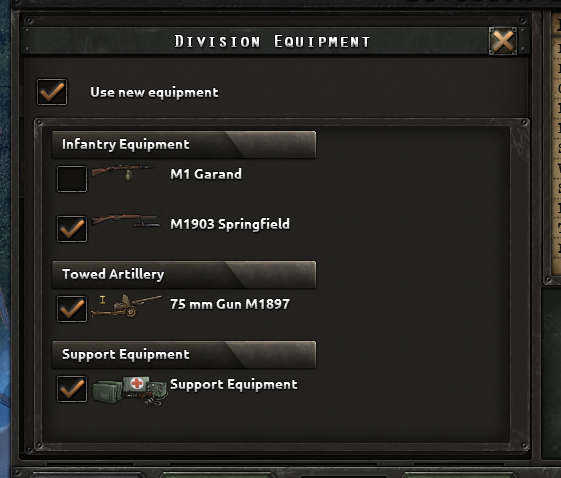
To the right of the parachute icon is the Division Equipment button. Selecting this button will bring up a new menu showing all of the equipment stockpiled that the template can use. This allows the player to control what specific weapon types the units with this template may use, so it is valuable if the player is seeking to have certain units use older equipment and stockpile a reserve of new equipment for other units or other purposes such as lend-lease shipments. Equipment already in the field won't be returned unless it is replaced by an upgrade or the template changes so that type is no longer used.
Equipment priorities
Below the division equipment button and to the right of the template name are the division priority options. Divisions with higher priorities will receive equipment and reinforcements before divisions with lower priorities. A template can have one of three priority options:
- Reserves: Units with this template will receive equipment last and at the lowest priority once deployed. Perfect for units set to guard bases or control resistance.
- 默认值: Units with this template get average priority for equipment and reinforcement once deployed. Recommended for the player's standard divisions.
- 精锐: Units with this template will receive equipment before anyone else once deployed and at the highest priority. Use it for the army's best men and where they can do the most good.
Battalions and companies
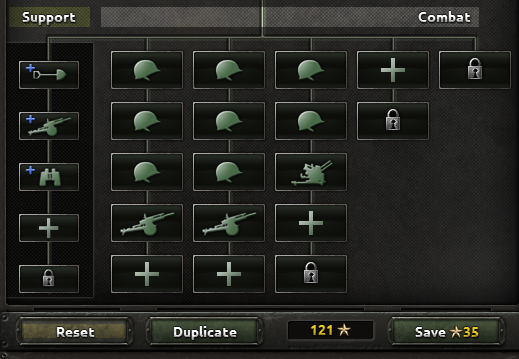
Battalions
Battalions, sometimes called "combat battalions", "line battalions", or "line troops", are the frontline troops of a division. They are organized into at most 5[1] brigades (represented as vertical columns) that can have up to 5[2] battalions each (initially 4[3], but increased to 5 with 陆军学说), totaling up to a maximum capacity of 25 battalions per division. Battalions fall into six broad categories: 步兵, combat support, mobile, mobile combat support, 装甲, and armored combat support. Each brigade may only have battalions from the same category, but can have any combination of battalions within that category.
It costs 5[4]陆军经验 to add, remove, or replace a battalion. The first regiment is free, but each regiment of a different category costs 20[5]陆军经验 - thus it is important to know which category of battalions you will have the most of and make sure your first battalion is of that category.
支援连
支援连 are auxiliary forces that stay behind the front line, providing general all-round bonuses to the divisions they're assigned to. There are many different support companies that can be unlocked through the 支持连 research tree, the 火炮 research tree, special projects, and country-specific 国策. Up to 5[6] can be assigned to a division, but no more than one of each type. They do not affect a division's combat width, and they usually do not affect its max speed other than through 地形 movement bonuses granted by some support companies. Most support companies of  伞兵 divisions can 空降 with their division, though some heavier support companies cannot do this.
Each support company costs 10[7]陆军经验 to add, replace, or remove from a template.
Stats
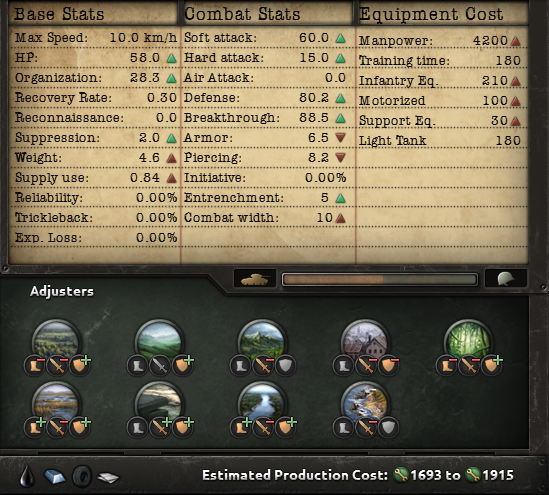
The right side of the division designer show the stats of the currently selected template. These stats will change as battalions and companies are added or removed from the division.
硬度
Below the main stats window is a hardness indicator, shown as a bar with a tank icon to the left and an infantry helmet icon to the right. Some equipment, motorized and tanks in particular, have a hardness stat represented by a percentage. This stat contributes to the overall hardness of the division they are in. Divisions with high hardness take less damage from soft attacks, but receive more damage from hard attacks. To increase a template's hardness, add more units with higher hardness stats, or remove them to increase softness.
Adjusters
The net adjuster for a division is the average of its combat battalions, plus the sum of the adjusters of its support battalions for the division as a whole. Every adjuster has three small icons that indicate the respective adjusters in the fields of mobility, attack and defense, 红色 being a disadvantage and 绿色 being a bonus.
花费
The lower-right corner of the window, below the adjusters, shows what resources and the minimum and maximum 生产 cost needed to produce the equipment to supply the division.
Subject forces
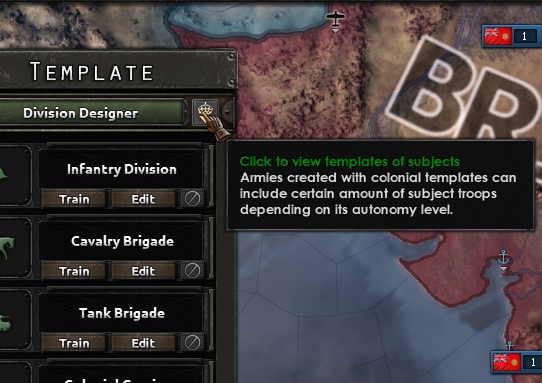
Countries that have 附属国 are able to recruit divisions using their subjects' templates. Subject forces draw equipment from their overlord and manpower from both their home country and their overlord. How much manpower comes from each depends on the subject's autonomy level. Colonies must provide for 70% of a division's manpower, puppets must provide 90%, and integrated puppets must provide 100%. Countries cannot recruit from a dominion, although they may still request the dominion to provide forces. Although subject forces are under complete control of their overlord, they can only be deployed in their home country, from which they may travel elsewhere. One cost of deploying them is that increases the subject's autonomy.
In order to recruit subject forces, select the colonial templates button in the upper-right corner of the templates panel. This will bring up a list of available subjects where troops can be raised, as well as show their autonomy level. Select a subject to see a list of their division templates. From here the templates can be viewed or copied. Selecting the copy button will place a copy of that template into the home country's template list, where they can be edited using the overlord's Army Experience. Colonial templates will show the flag of their home country to the bottom-left of their icon.
Early Template Divisions
Each country has a set of preliminary division templates, some of which will already be in use by existing divisions. A significant number of these templates encompass a single type of battalion and lack the inclusion of any support companies. It is possible that they may prove useful in the role of occupation or garrison troops, despite their lack of apparent combat capability. Mobile units are capable of outpacing infantry units and are a valuable asset for an army. Divisions that include cavalry (which is essentially mounted infantry) may prove valuable in this role for an extended period.
It is often advantageous to retain a copy of the original form of a template that is being modified, as this allows it to be used as a base for subsequent designs, thereby saving experience points (XP). Furthermore, these templates can be readily replicated and stored under a distinct designation within the Division Designer.
参考资料
- ↑
NDefines.NMilitary.MAX_DIVISION_BRIGADE_WIDTH = 5中的 定义文件。 - ↑
NDefines.NMilitary.MAX_DIVISION_BRIGADE_HEIGHT = 5中的 定义文件。 - ↑
NDefines.NMilitary.MIN_DIVISION_BRIGADE_HEIGHT = 4中的 定义文件。 - ↑
NDefines.NMilitary.BASE_DIVISION_BRIGADE_CHANGE_COST = 5中的 定义文件。 - ↑
NDefines.NMilitary.BASE_DIVISION_BRIGADE_GROUP_COST = 20中的 定义文件。 - ↑
NDefines.NMilitary.MAX_DIVISION_SUPPORT_WIDTH = 1和NDefines.NMilitary.MAX_DIVISION_SUPPORT_HEIGHT = 5,见定义文件。 - ↑
NDefines.NMilitary.BASE_DIVISION_SUPPORT_SLOT_COST = 10中的 定义文件。
| 政治 | 意识形态 • 阵营 • 国策 • 理念 • 政府 • 傀儡国 • 流亡政府 • 外交 • 世界紧张度 • 内战 • 占领 • 力量均势 |
| 生产 | 贸易 • 生产 • 建造 • 装备 • 燃料 • 军工组织 • 国际市场 |
| 科研与科技 | 科研 • 步兵科技 • 支援连科技 • 装甲科技(也包括 未拥有绝不后退)• 火炮科技 • 陆军学说 • 特种部队学说 • 海军科技(也包括 未拥有全民持枪)• 海军支援科技 • 海军学说 • 空军科技(也包括 未拥有以血盟誓)• 空军学说 • Engineering科技 • Industry科技 • 特殊项目 • 科学家 |
| 军事与战争 | 战争 • 和平会议 • 陆军单位 • 陆战 • 师编制设计 • 坦克设计 • 陆军编制器 • 集团军 • 指挥官 • 作战计划 • 战斗战术 • 舰船 • 舰船设计(伦敦海军条约)• 海战 • 飞机设计 • 空战 • 经验 • 军官团 • 损耗与事故 • 后勤 • 人力 • 核弹 • 突袭 |
| 间谍活动 | 情报 • 情报机构 • 特工 • 任务 • 行动 |
| 地图 | 地图 • 省份 • 地形 • 天气 • 州 |
| 事件与决议 | 事件 • 决议 |